 GNU ELPA: jit-spell
jit-spell 
- Description
- Just-in-time spell checking
- Latest
- jit-spell-0.6.tar (.sig), 2026-Nov-09, 60.0 KiB
- Maintainer
- Augusto Stoffel <arstoffel@gmail.com>
- Other versions:
- development version
- Website
- https://github.com/astoff/jit-spell
- ELPA's Repository
- CGit or Gitweb
- All Dependencies
- compat (.tar)
To install this package from Emacs, use package-install or list-packages.
Full description

jit-spell is a spell-checking package for Emacs. It highlights all misspelled words in a window, just like a word processor or web browser does.
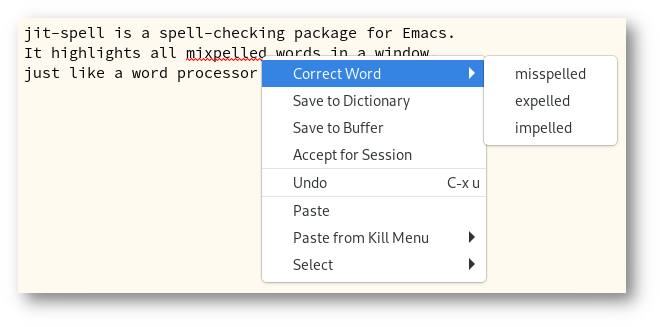
Figure 1: Correcting a misspelling with jit-spell
This behavior is different from the built-in Flyspell package, which only checks words as the cursor moves over them.
jit-spell is part of GNU ELPA and can be installed with M-x
package-install RET jit-spell RET. As a complement, you may also
want to install the vibe-spell package; see section “Engines” below.
1. Usage
To enable spell checking in a buffer, type M-x jit-spell-mode RET.
To correct a misspelling, you can right-click the word (assuming you
have context-menu-mode activated) or call the command
jit-spell-correct-word, which uses the minibuffer to read a
correction or accept the word.
To make your settings permanent, you may wish to add some variant of the following to your init file:
(add-hook 'text-mode-hook 'jit-spell-mode)
(add-hook 'prog-mode-hook 'jit-spell-mode)
(with-eval-after-load 'jit-spell
  (keymap-set jit-spell-mode-map "C-;" 'jit-spell-correct-word))
Try also M-x customize-group RET jit-spell RET to see a listing of
all possible customization options.
2. Language selection
Type M-x jit-spell-dictionary RET to choose a different spelling
language (or languages). You also call that command with a prefix
argument in order to save the dictionary choice permanently, either as
a file-local variable or dir-local variable.
Moreover, you can set the default dictionary by customizing the
variable jit-spell-dictionary. If it is nil, the default dictionary
is determined by the “legacy” ispell-dictionary variable or your
system's locale setting.
3. Major mode support
Often there are regions of the buffer that should be ignored for spell-checking purposes. In most cases, no additional configuration is necessary.
The simplest mechanism to make adjustments is the user option
jit-spell-ignored-faces. Any word fontified with one of these faces
in this list ignored by jit-spell. To find out which faces are
present on a given character, you can use the describe-char command.
In all programming language modes, spell checking is restricted to
comments, docstrings and strings. This can be modified by customizing
the variable jit-spell-prog-mode-faces.
4. Spellchecking engines
jit-spell supports two spellchecking backends. The default method is
to run a spellchecker as a subprocess, using the standard ispell -a
interface. This forces us to compute all correction suggestions for
misspellings eagerly, even if they will never be used. As a
consequence, it takes (visibly) longer to complete and uses more
systems resources. That said, since jit-spell runs asynchronously, it
should not slow down Emacs itself.
As a better performing alternative, jit-spell can use vibe-spell, a port of Hunspell to pure Emacs Lisp. It is selected automatically as the jit-spell backend when available, so it suffices to install that package with the following command:
M-x package-vc-install RET https://github.com/astoff/vibe-spell RET
5. Contributing
Discussions, suggestions and code contributions are welcome! Since this package is part of GNU ELPA, contributions require a copyright assignment to the FSF.
Old versions
| jit-spell-0.5.tar.lz | 2025-Oct-12 | 10.0 KiB |
| jit-spell-0.4.tar.lz | 2024-Mar-31 | 9.27 KiB |
| jit-spell-0.3.tar.lz | 2023-Mar-30 | 8.70 KiB |
| jit-spell-0.2.tar.lz | 2023-Mar-11 | 8.52 KiB |
| jit-spell-0.1.tar.lz | 2023-Mar-05 | 7.55 KiB |
News
Version 0.6
- Add `jit-spell-dictionary' variable and rename the
 `jit-spell-change-dictionary' to `jit-spell-dictionary'.
- Define `jit-spell-engine' and add support for vibe-spell.